
In short
- Webhooks are async and stateless, so traditional debuggers don't apply
- The most common mistake: processing the payload before logging it
- Local debugging requires a public URL; ngrok and smee.io get you there in seconds
- Structured logs beat console.log at every stage of the pipeline
- Production debugging lives or dies by delivery logs, replay, and failed event visibility
---
Webhooks don't wait for you. They fire, hit your endpoint, and disappear. If something goes wrong, there's no stack trace pointing at the culprit. No breakpoint to step through. Just a silent failure and a confused sender retrying into the void.
This is the fundamental debugging problem with webhooks: they're push-based and asynchronous, which puts them outside the normal request/response model that most debugging tools are built for. Add in signature verification, middleware chains, and the occasional JSON encoding surprise, and you've got a reliable source of late-night incidents.
This guide covers a practical debugging system that works in both local development and production. It's the same approach across every webhook integration, whether you're handling Stripe payments or building an agent that listens for external events.
---
1. Why webhooks resist standard debugging
With a normal HTTP request, you can reproduce the failure on demand. You control the input, you see the output, you step through the code. Webhooks flip this model.
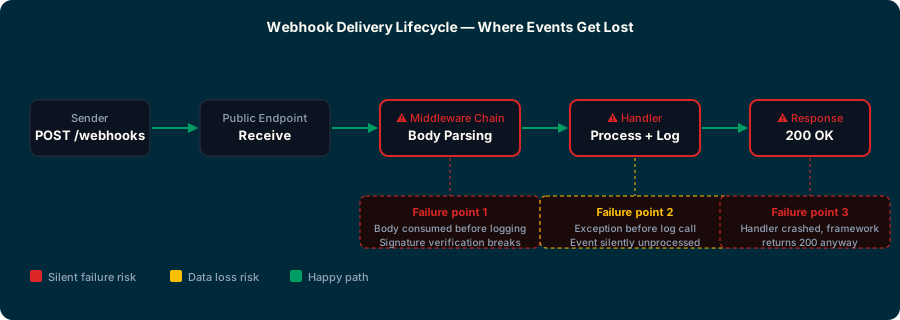
The sender controls when events fire. You can't pause the world mid-delivery. And in most setups, once an event hits your endpoint and gets a 2xx response, that's the end of the story as far as the sender is concerned. If your handler crashes internally without affecting the response code, the sender never knows.
A few failure patterns that catch developers off guard:
- Silent 500s. Your handler panics internally, but the HTTP framework still returns 200. The event is marked delivered. The data was never processed.
- Middleware mutation. Body parsing middleware consumes the raw request stream before your handler sees it. Signature verification breaks. You get a cryptic
invalid signatureerror that has nothing to do with your keys. - Late logging. You log after processing. An exception before the log call means you never see what arrived.
- Local dev black hole. Your laptop has no public IP. The sender's request never arrives. You spend an hour debugging a handler that was never called.
---
2. Inspect raw payloads before processing anything
The single most useful habit in webhook debugging: log the raw request body and headers before your code touches them.
Not after parsing. Not after middleware. Before.
app.post('/webhooks', express.raw({ type: '*/*' }), (req, res) => {
  // Log raw before anything else
  console.log({
    headers: req.headers,
    rawBody: req.body.toString('utf8'),
    timestamp: new Date().toISOString(),
  });

  // Now verify signature, then parse
  verifySignature(req);
  const payload = JSON.parse(req.body);
  // ...
});
This pattern solves two problems at once. You see exactly what arrived, and signature verification gets the unmodified raw body it needs to work correctly.
For quick inspection during development, a dedicated catch-all route is useful:
app.all('/debug/webhook', express.raw({ type: '*/*' }), (req, res) => {
  console.log('Method:', req.method);
  console.log('Headers:', JSON.stringify(req.headers, null, 2));
  console.log('Body:', req.body.toString('utf8'));
  res.status(200).json({ received: true });
});
Point the sender at /debug/webhook temporarily. You'll see exactly what you're working with before your production handler gets involved.
---
3. Local development setup
Your laptop isn't on the public internet. The sender can't reach localhost:3000. You need a tunnel.
ngrok is the standard choice. Free tier is sufficient for development:
ngrok http 3000
# Outputs: https://abc123.ngrok-free.app -> localhost:3000
The ngrok inspector at localhost:4040 is the hidden gem here. It shows every request that came through, the full headers and body, the response your handler returned, and lets you replay any request with one click. Replay is what saves hours.
smee.io is a lighter option when you don't want an account:
npm install -g smee-client
smee --url https://smee.io/your-channel-id --target http://localhost:3000/webhooks
Smee proxies events from a public channel URL to your local server. Good for CI pipelines and shared dev environments where everyone needs the same endpoint.
webhook.site is useful for pure inspection without running any local code. Point the sender at your webhook.site URL and watch requests arrive in the browser. Useful for confirming what the sender actually sends before you build the handler.
---
4. Log the right things in production
console.log(payload) gets you through development. It won't help you in production at 2 AM.
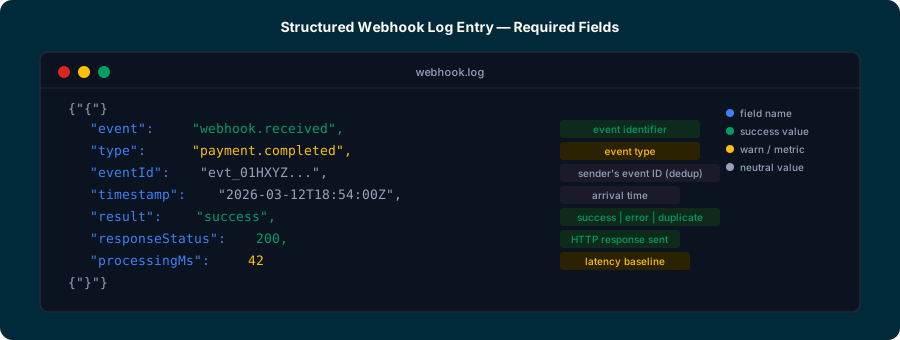
Structured logs do. At minimum, every webhook delivery should produce a log entry with:
- Timestamp (when did this arrive)
- Event type (what kind of event)
- Event ID (from the sender's headers; critical for dedup and replay correlation)
- Raw body or payload hash (what arrived)
- Processing result (success, validation error, handler error)
- Response status (what you returned to the sender)
- Processing duration (latency baseline)
logger.info({
  event: 'webhook.received',
  type: payload.type,
  eventId: req.headers['webhook-id'],
  processingMs: Date.now() - start,
  result: 'success',
});
Log idempotency key hits separately. When a duplicate arrives and you skip processing, that's a different log event than a failure. Mixing them obscures your actual error rate.
---
5. Replay without retriggering real events
Reproducing a specific failure means firing the exact payload that caused it. Re-triggering the real event (completing a payment, sending a message) to generate a test webhook isn't practical.
The better approach: capture and store raw payloads on arrival, then replay them locally.
// Save raw payload to file on arrival (dev only)
if (process.env.NODE_ENV === 'development') {
  fs.writeFileSync(
    `./captured/${Date.now()}-${payload.type}.json`,
    req.body.toString('utf8')
  );
}
Then replay with curl:
curl -X POST http://localhost:3000/webhooks \
  -H "Content-Type: application/json" \
  -H "webhook-signature: sha256=your_signature" \
  --data-binary @captured/1710000000-payment.completed.json
For providers with CLI tools, synthetic events are even faster:
stripe trigger payment_intent.succeeded
gh api /repos/org/repo/dispatches -f event_type=deploy
If you're using Hookwing, every delivered event appears in your delivery log and can be replayed with one click: the full original payload, headers intact, sent back to any endpoint in your account.
---
6. Debugging in production
Local debugging confirms your handler is correct. Production debugging tells you what's actually happening at scale.
The key things to have visible in production:
Delivery logs. Every attempt, with the payload received, the response returned, and the timestamp. Without this, you're guessing what arrived and when.
Retry state. Is an event in an active retry loop? How many attempts have fired? What response did each get? This tells you whether a failure is transient or permanent before you intervene.
Endpoint health. Repeated 4xx or 5xx responses from the same endpoint over a short window should trigger an alert. A bad deployment that breaks your webhook handler will generate a wave of failures that's easy to catch early if you're watching. The webhook monitoring guide covers the full alerting setup.
Dead letter queue depth. If events are reaching the DLQ, something is broken at the handler level, not the network level. DLQ depth above zero is always worth investigating. The webhook DLQ guide covers how to build recovery from there.
---
Conclusion
Webhook debugging comes down to visibility at every stage: what arrived, what your code did with it, and what you returned. The tools are simple. A raw body logger, a local tunnel, structured log output, and a replay mechanism cover most debugging scenarios.
The mistakes to avoid are all on the logging side. Processing before logging, losing the raw body to middleware, and mixing idempotency hits with genuine errors all make failures harder to diagnose. Get the logging right first, and the rest follows.
---
Debug and monitor webhooks with Hookwing
Hookwing gives you delivery logs, retry visibility, and one-click replay for every webhook event. See exactly what arrived, what failed, and why.
---
Image plan
Hero image
- Purpose: Establish the article's theme — capturing and inspecting webhook events like a flight data recorder
- Style: Aviation-themed dark illustration, Hookwing brand colors (#002A3A background, #009D64 accents)
- Suggested caption: n/a (hero images don't have captions)
- Suggested alt: "Aviation-themed illustration of a flight data recorder capturing webhook event streams in a dark technical diagram"
- Save to:
website/assets/blog/generated/debugging-webhooks-hero.png
Inline image 1 (after section 1)
- Purpose: Flow diagram showing where webhook events fail silently in a typical middleware chain
- Style: Dark-background technical diagram with labeled failure points (middleware, handler, response)
- Caption: "Where webhook events get lost: the three common failure points."
- Alt: "Webhook delivery lifecycle diagram showing failure points at middleware, handler, and response stages"
- Save to:
website/assets/blog/illustrations/debugging-webhooks-lifecycle.svg
Inline image 2 (after section 4)
- Purpose: Structured log entry visual — shows exactly what fields to capture
- Style: Dark terminal-style card, color-coded fields using brand palette
- Caption: "A complete webhook log entry: everything you need to diagnose any delivery."
- Alt: "Structured webhook log entry showing timestamp, event type, event ID, result, and processing duration fields"
- Save to:
website/assets/blog/illustrations/debugging-webhooks-log-entry.svg